
Auction
List your artwork as an English auction with configurable bidding options and anti-sniping protection.
- Set termsReserve, increment, start, and duration
- Collectors bidEach bid beats the last by your increment
- Auction endsThe highest bidder wins
- SettleEither side settles: art to the winner, proceeds to you
What are Auctions?
Auctions follow the traditional English auction format where collectors compete by placing increasingly higher bids on your artwork. Unlike fixed-price sales, auctions create competitive bidding environments that can drive prices above your initial expectations. The highest bidder when the auction ends wins the artwork.
This page is for sellers. Bidding covers the same auction from the collector's side.
Key Features
-
Competitive Bidding
English auction format where each bid must exceed the previous bid by your configured increment.
-
Anti-Sniping Protection
Optional end phase extends auction time when bids are placed near the deadline, ensuring fair competition.
-
Reserve Price Protection
Set a minimum acceptable price that the first bid must meet. An On bid auction starts when a bid meets it, and a scheduled auction that never gets one ends with no winner.
-
Flexible Start Options
Start immediately on first bid or schedule for a specific date and time.
-
Physical Integration
Optionally include a physical artwork with unlock pricing and shipping address collection.
Sales Configuration
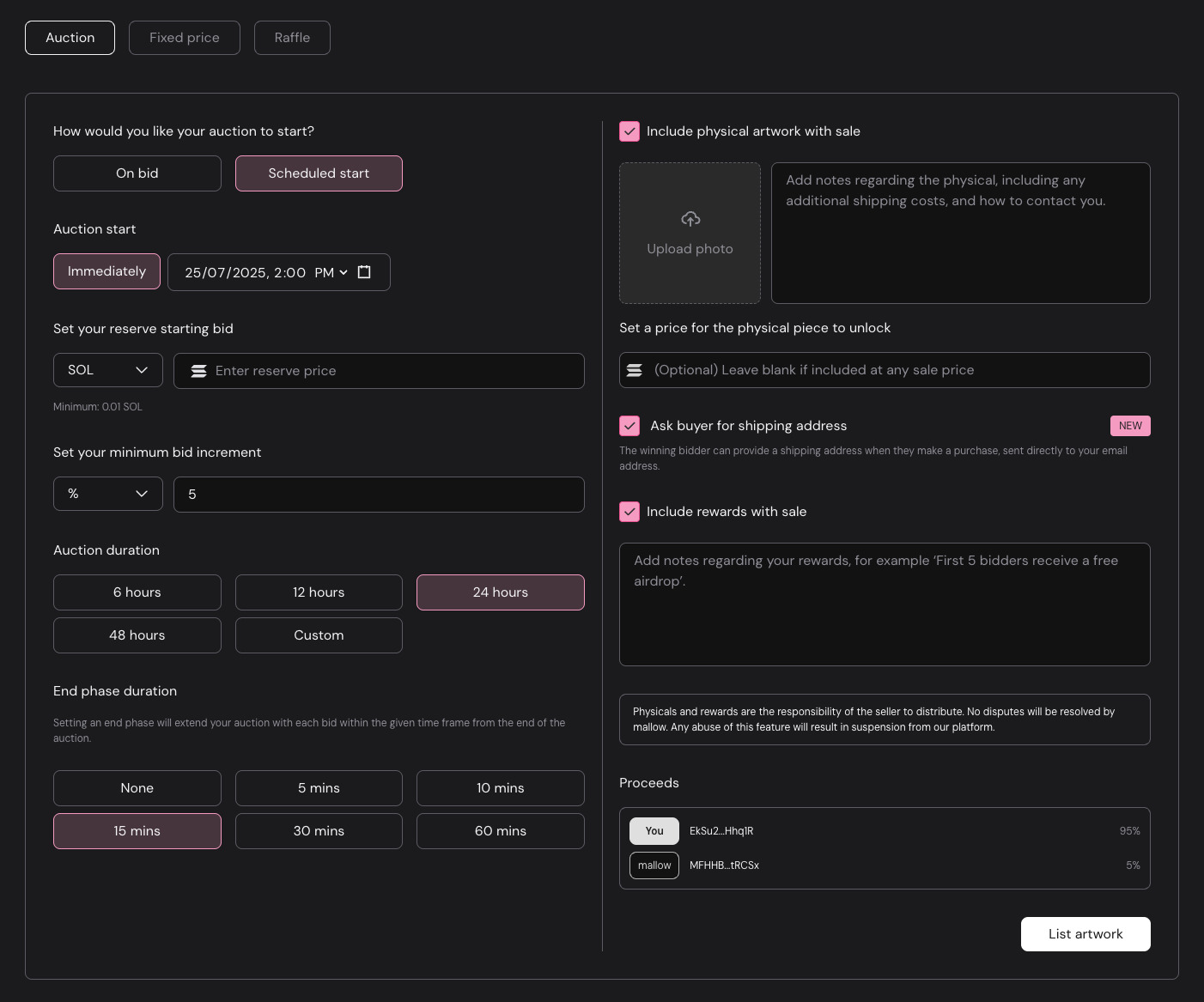
Auction Start Configuration
- On bid - Auction starts immediately when the first bid is placed
- Scheduled start - Start immediately or set a future date and time for your auction to begin (all times are in your local timezone)
Reserve Price Settings
- Currency: Choose between SOL, USDC, or other supported tokens
- Reserve price: Enter the minimum amount you're willing to accept
Bid Increment Configuration
- Increment type: Choose between percentage (%) or fixed amount
- Percentage increment: Each bid must be at least this % higher than the previous bid
- Fixed amount: Alternative option for a static token amount increases
Auction Duration
How long do you want your auction to run?
End Phase Configuration
Setting an end phase will extend your auction with each bid within the given time frame from the end of the auction. This prevents users from "sniping" your auction at the last second, allowing for other bidders to increase their bid.
- None - Auction ends exactly at the scheduled time
- Timed - Any bid placed within the end phase moves the end time to the bid time plus the end phase. For example, an auction set to end at 2:00 PM has a 5-minute end phase. A bid at 1:57 PM falls inside that window, so the auction now ends at 2:02 PM, 5 minutes after the bid. Each later bid inside the window extends it again.
A bid at 1:57 PM is inside the end phase, so the end moves to 1:57 PM + 5 min = 2:02 PM.
Physical Artwork
- Include physical artwork with sale - Check this if you're selling a physical piece along with the NFT
- Describe any pertinent shipping details the collector should know about
- Optionally upload a photo of the physical piece to show collectors what they're getting
- Unlock price - Specify an unlock price for the physical (bid amounts below this do not receive the physical)
- Ask buyer for shipping address - Check this if you want the winner of the auction to send you their shipping address through mallow.
Physicals explains the unlock price, how the address reaches you, and what you're responsible for.
Rewards
If you want to reward auction bidders or the winner with something special, let them know here!
Getting Started
Configure Your Auction
- Set your reserve price and preferred currency
- Choose bid increment type (percentage or fixed amount)
- Decide on auction duration and end phase settings
Set Start Timing
- Choose "On bid" for immediate start when first bid is placed
- Or schedule a specific start date and time for marketing purposes
Add Physical Components (Optional)
- Enable physical artwork inclusion if applicable
- Set unlock price threshold for physical items
- Configure shipping address collection
Launch and Monitor
- Review all settings before going live
- Promote your auction to drive initial bidding
- Monitor bidding activity and engage with your community
Settle Auction
- Either the winning bidder (Claim NFT) or the seller (Claim proceeds) can settle the auction, at which point the proceeds are sent to the seller and the artwork to the winning bidder
- If your auction concluded with no bids, you can take your artwork back with Reclaim NFT on the artwork page
- mallow's fee and the creator's royalties are taken from the winning bid. See Fees
Click the List Artwork button from your artwork page to get started!