
Fixed Price Editions
Sell editions at a fixed price, for free or at a price the collector chooses, with scheduling, allowlists, wallet limits and up to four price tiers.
- Sale startsImmediately or at a scheduled time
- Allowlist phaseOptional: your collectors, collections, or wallets
- Public saleAnyone can buy, within the per-wallet limit
- Sale endsAt your end time, or stays open
What are Fixed Price Editions?
The Fixed Price format is a straightforward sales format for selling artwork at a predetermined price. Unlike auctions, collectors know exactly what they'll pay and can purchase immediately.
To sell editions you first mint a master edition. Buying covers the collector's side of an edition sale.
Key Features
-
Flexible Pricing Models
Choose from fixed price, free, or allow the collector to choose their price (SYOP).
-
Edition Tiers
Sell up to 4 different editions on one page with tiered pricing and physical rewards. Perfect for offering digital-only and digital + physical options at different price points.
-
Scheduling Control
Set specific start and end times, or run indefinitely with full timezone support.
-
Allowlist Phases
Create exclusive presale periods for collectors, specific communities, or wallet addresses.
-
Purchase Limits
Set per-wallet limits to ensure fair distribution among collectors.
-
Physical Integration
Seamlessly include physical artworks with shipping address collection.
Sales Configuration
Pricing
- Fixed price - Set a specific price for each edition
- Free - Offer your editions for free
- Collector chooses price - Let buyers decide how much to pay. Also known as SYOP (Set-your-own-price).
Start Time
Start immediately or set a future date and time for your sale to go live (all times are in your local timezone).
End Time
Keep the listing active indefinitely or set a duration / specific end date and time to end your sale.
Buy Limit Per Wallet
Optionally set a specific limit of how many editions each wallet can purchase
Allowlist
Optionally gate your sale so only specific users can collect your edition to start.
- All of my collectors - Allow holders of your artworks to buy
- Specific collection - Allow holders of any artwork in up to 10 collections to buy
- Specific wallets - Allow only specific wallets to buy
- Duration - How long the allowlist phase will run for before anyone can collect your edition, or Entire sale to keep the sale allowlist-only throughout.
Compressed NFTs don't count towards All of my collectors or Specific collection eligibility.
Physical Artwork
- Include physical artwork with sale - Check this if you're selling a physical piece along with the editions.
- Describe any pertinent shipping details the collector should know about
- Optionally upload a photo of the physical piece to show collectors what they're getting
- Unlock price - With Collector chooses price, optionally set the lowest price that includes the physical.
- Ask buyer for shipping address - Check this if you want collectors to send you their shipping address through mallow.
See Physicals for the full details, including how edition tiers handle physicals.
Rewards
If you want to reward buyers with something special, let them know here!
Edition Tiers
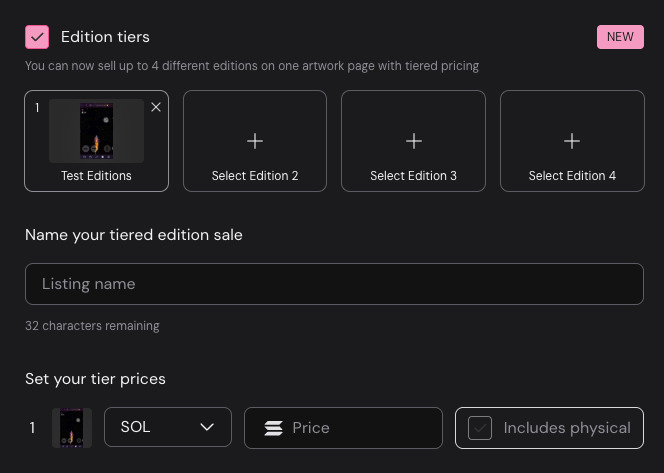
Enable this feature to sell up to 4 different editions on one artwork page with tiered pricing. This allows you to sell similar editions at different price points and offer physicals with select tiers!
- Select artworks - Select the different editions you want to sell together
- Choose price - Select prices for each tier and specify if a physical is included
Getting Started
Choose Your Pricing Strategy
- Decide between fixed price, free, or collector-chosen pricing
- Consider your audience and artwork value when setting prices
- Plan for multiple tiers if offering different edition levels
Configure Sale Timing
- Set start time (immediate or scheduled launch)
- Choose end time (indefinite or specific duration)
- Plan allowlist phases if targeting specific communities
Set Access Controls
- Configure per-wallet purchase limits for fair distribution
- Set up allowlist targeting collectors, communities, or specific wallets
- Define allowlist phase duration before public access
Launch and Promote
- Review all settings and pricing before going live
- Announce to your community, especially allowlisted collectors
- Monitor sales and engage with collectors throughout the sale period
Click the List Artwork button from your artwork page to get started!